*Monitor
A computer monitor is an output device that displays information in pictorial or text form. A monitor usually comprises a visual display, some circuitry, a casing, and a power supply. The display device in modern monitors is typically a thin film transistor liquid crystal display (TFT-LCD) with LED backlighting having replaced cold-cathode fluorescent lamp (CCFL) backlighting. Previous monitors used a cathode ray tube (CRT) and some Plasma (also called Gas-Plasma) displays. Monitors are connected to the computer via VGA, Digital Visual Interface (DVI), HDMI, DisplayPort, USB-C, low-voltage differential signaling (LVDS) or other proprietary connectors and signals.

A computer keyboard is a peripheral input device modeled after the typewriter keyboard[1] which uses an arrangement of buttons or keys to act as mechanical levers or electronic switches. Replacing early punched cards and paper tape technology, interaction via teleprinter-style keyboards have been the main input method for computers since the 1970s, supplemented by the computer mouse since the 1980s.

Keyboard keys (buttons) typically have a set of characters engraved or printed on them, and each press of a key typically corresponds to a single written symbol. However, producing some symbols may require pressing and holding several keys simultaneously or in sequence.While most keyboard keys produce letters, numbers or symbols (characters), other keys or simultaneous key presses can prompt the computer to execute system commands, such as such as the Control-Alt-Delete combination used with Microsoft Windows.In a modern computer, the interpretation of key presses is generally left to the software: the information sent to the computer, the scan code, tells it only which key (or keys) on which row and column, was pressed or released.
In normal usage, the keyboard is used as a text entry interface for typing text, numbers, and symbols into application software such as a word processor, web browser or social media app.
Whether it's a gaming system or a home PC, the five main components that make up a typical, present-day computer include:
- A motherboard
- A Central Processing Unit (CPU)
- A Graphics Processing Unit (GPU), also known as a video card
- Random Access Memory (RAM), also known as volatile memory
- Storage: Solid State Drive (SSD) or Hard Disk Drive (HDD).

In terms of construction, each of these main components are attached to the motherboard and then put into a protective case—resembling the clean, polished look most of us are accustomed to seeing.
Sure, most computers have their own distinct design - and different brands of hardware installed - but the components listed above are standard across all computers.
1.Motherboard
What it is: All components of a computer communicate through a circuit board called the motherboard, as was mentioned above.
What it does: Think of the motherboard as the glue that holds everything else together.
(The Raspberry Pi, like the one featured in our summer course for kids, Build and Code Your Own Take-Home Laptop, is a motherboard.)
The motherboard’s video card and Central Processing Unit are contained in an integrated (built-in) chipset, shown in the picture below:
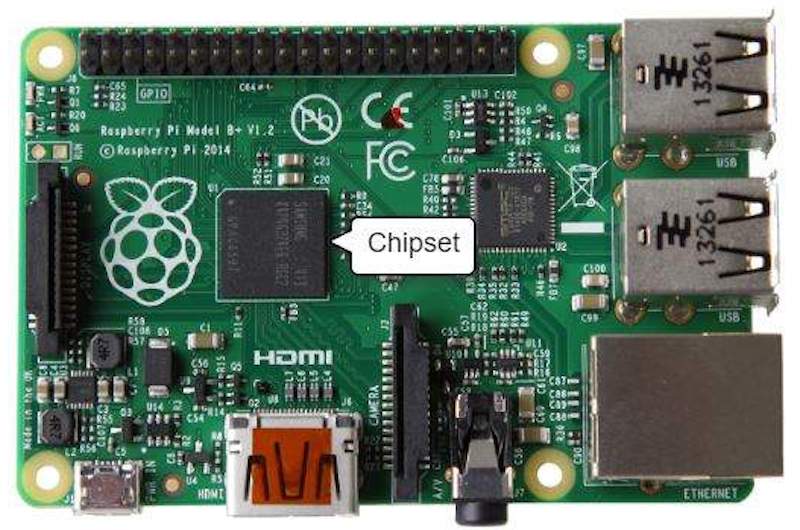
This is where input/output devices such as a keyboard, mouse, and speakers get plugged in.
2. Central Processing Unit (CPU)
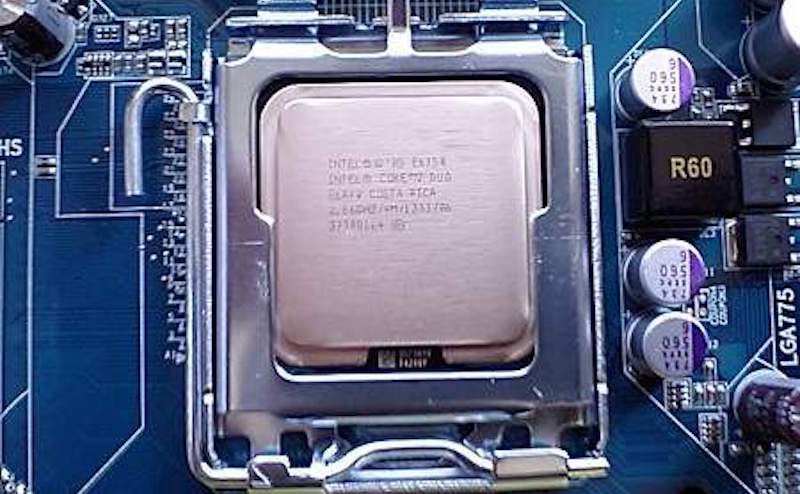
The CPU is often called the "brain" of a computer, thanks to its direct plug connection to the motherboard, and communication with all of the computer’s other components.
Whenever you write a line of code (in Python, Java, C++, or any other programming language), it's broken down into assembly language—which is a language that the processor can understand. It fetches, decodes, and executes these instructions.
And that’s where the CPU comes in—all the processes a computer handles are taken care of by the CPU.
3. Graphics Processing Unit (GPU)
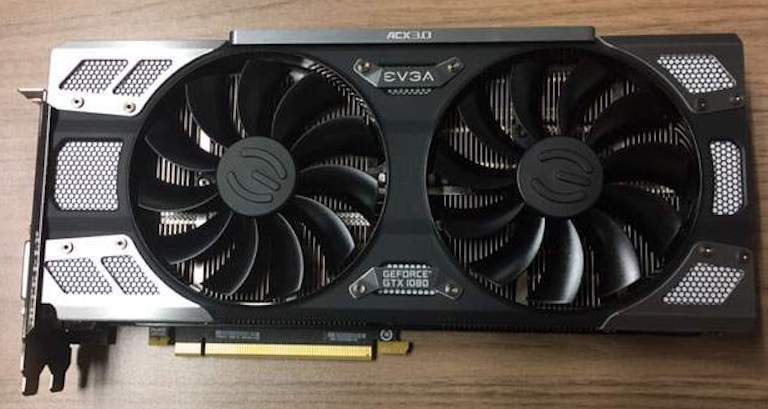
It's not uncommon to hear gamers obsess over the next new graphics card, as these graphic cards make it possible for computers to generate high-end visuals like those found in the many different types of video games.
In addition to video games, though, good graphics cards also come in handy for those who rely on images in order to execute their craft, like 3D modelers using resource-intensive software.
What it does: Graphics cards often communicate directly with the display monitor, meaning a $1,000 graphics card won't be of much use if there isn't a high-end monitor connected to it.
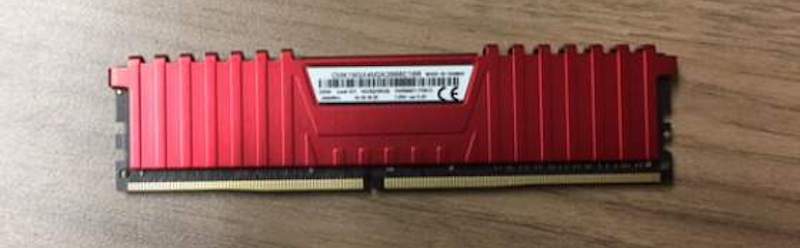
4. Random Access Memory (RAM)
RAM, also known as volatile memory, stores data regarding frequently accessed programs and processes. (It's called volatile memory because it gets erased every time the computer restarts.)
What it does: RAM helps programs and games start up and close quickly.
5. Storage
All computers need somewhere to store their data. Modern computers either use a Hard Disk Drive (HDD) or Solid State Drive (SSD).
What it does: HDDs are made of an actual disk onto which data is stored. The disk is read by a mechanical arm. (HDDs are cheaper than SSDs, but are slowly becoming more and more obsolete.)
SSDs (think SIM cards) have no moving parts and are faster than a hard drive, because no time is spent waiting for a mechanical arm to find data on a physical location on the disk
For fun
Some enjoy computers from the frontend, spending time on YouTube, shopping on eBay, and playing video games and experiencing the benefits of doing so.
* Write characteristics of a computer?
Basic characteristics about computer are:
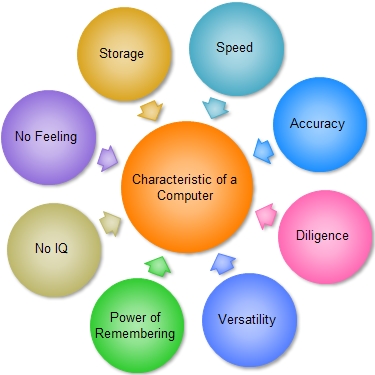
Accuracy: –The degree of accuracy of computer is very high and every calculation is performed with the same accuracy. The accuracy level is 7.
determined on the basis of design of computer. The errors in computer are due to human and inaccurate data.
Diligence: – A computer is free from tiredness, lack of concentration, fatigue, etc. It can work for hours without creating any error. If millions of calculations are to be performed, a computer will perform every calculation with the same accuracy. Due to this capability it overpowers human being in routine type of work.
Versatility: – It means the capacity to perform completely different type of work. You may use your computer to prepare payroll slips. Next moment you may use it for inventory management or to prepare electric bills.
No IQ: – Computer is a dumb machine and it cannot do any work without instruction from the user. It performs the instructions at tremendous speed and with accuracy. It is you to decide what you want to do and in what sequence. So a computer cannot take its own decision as you can.
No Feeling: – It does not have feelings or emotion, taste, knowledge and experience. Thus it does not get tired even after long hours of work. It does not distinguish between users.
Storage: – The Computer has an in-built memory where it can store a large amount of data. You can also store data in secondary storage devices such as floppies, which can be kept outside your computer and can be carried to other computers.
*What is a computer Mouse?
A computer mouse (plural mice, sometimes mouses)[nb 1] is a hand-held pointing device that detects two-dimensional motion relative to a surface. This motion is tyThe first public demonstration of a mouse controlling a computer system was in 1968. Mice originally used two separate wheels to track movement across a surface; one in the X-dimension, and one in the Y. Later, the standard design shifted to utilise a ball rolling on a surface to detect motion. Most modern mice use optical sensors that have no moving parts. Though originally all mice were connected to a computer by a cable, some modern mice are cordless, relying on short-range radio communication with the connected system.
In addition to moving a cursor, computer mice have one or more buttons to allow operations such as selection of a menu item on a display. Mice often also feature other elements, such as touch surfaces and scroll wheels, which enable additional control and dimensional input.pically translated into the motion of a pointer on a display, which allows a smooth control of the graphical user interface of a computer.


The first public demonstration of a mouse controlling a computer system was in 1968. Mice originally used two separate wheels to track movement across a surface; one in the X-dimension, and one in the Y. Later, the standard design shifted to utilise a ball rolling on a surface to detect motion. Most modern mice use optical sensors that have no moving parts. Though originally all mice were connected to a computer by a cable, some modern mice are cordless, relying on short-range radio communication with the connected system.
In addition to moving a cursor, computer mice have one or more buttons to allow operations such as selection of a menu item on a display. Mice often also feature other elements, such as touch surfaces and scroll wheels, which enable additional control and dimensional input.
*What is an operating system?
Five of the most common operating systems are Microsoft Windows, Apple macOS, Linux, Android and Apple's iOS.
Microsoft Windows
Microsoft Windows has existed in one form or another since 1985, and it remains the most popular operating system for home and office computers. Its latest versions, including Windows 10, are also used on some tablets, and the OS is used on some web and number-crunching server computers as well. Computers from a wide variety of manufacturers can use Windows.
Initial versions of Windows worked with an earlier Microsoft operating system called MS-DOS, providing a modern graphical interface on top of DOS's traditional text-based commands. Signature features of Microsoft Windows's user interface include windows themselves – rectangle-shaped, on-panel screens that represent individual applications. The Windows Start menu has helped generations of users find programs and files on their devices.
Efforts to use versions of the Windows OS for smartphones have been less successful.
Apple iOS
Apple's iOS is one of the most popular smartphone operating systems, second only to Android. It runs on Apple hardware, including iPhones, iPad tablets and iPod Touch media players.
Signature features of iOS include the App Store where users buy apps and download free software, an emphasis on security including strong encryption to limit what unauthorized users can extract from the phone, and a simple, streamlined interface with minimal hardware buttons.
Google's Android OS
Android is the most popular operating system in the world judging by the number of devices installed. Largely developed by Google, it's chiefly used on smartphones and tablets. Unlike iOS, it can be used on devices made by a variety of different manufacturers, and those makers can tweak parts of its interface to suit their own needs.
Users can download custom versions of the operating system because large portions of it are open source, meaning anyone can legally modify it and publish their own. However, most people prefer to stick with the version that comes on their devices.
Android, like iOS, comes with an application and media store called the Play Store built by Google. Some phone manufacturers and other organizations also offer their own stores to install software and media.
Apple macOS
Apple's macOS, successor to the popular OS X operating system, runs on Apple laptops and desktops. Based in part on the historic family of Unix operating systems dating back to research in the 1960s at AT&T's Bell Labs, macOS shares some features with other Unix-related operating systems including Linux. While the graphical interfaces are different, many of the underlying programming interfaces and command line features are the same.
Signature elements of macOS include the dock used to find programs and frequently used files, unique keyboard keys including the Command key, and the stoplight-colored buttons used to resize open program windows. MacOS is known for its user-friendly features, which include Siri, a natural-voice personal assistant, and FaceTime, Apple's video-calling application
Linux Operating System
Unlike many other operating systems, development Linux isn't led by any one company. The operating system was created by Finnish programmer Linus Torvalds in 1991. Nowadays, programmers from all over the world collaborate on its open source code and submit tweaks to the central kernel software and other programs.
A wide assortment of commercial and open source software is available for Linux, and various Linux distributions provide custom user interfaces and tools for installing software onto machines running the operating system. A favorite of many programmers, Linux is widely used on corporate and scientific servers, including cloud computing environments. Linux can be run on a wide variety of hardware and is available free of charge over the internet.
What is computer
Computer kya hai
Computer jankari, computer ki jankari, computer information in badarpur